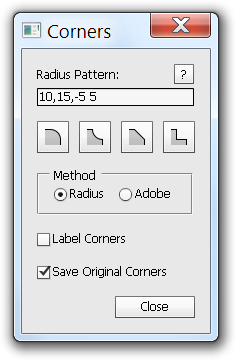
Corner Editor

This Photoshop script can do everything that the Rounded Rectangle Radius Resizer script can, and a lot more!

  • Round the corners of any polygonal shape
  • Multiple corner styles
  • Settings are saved to the Layer so they can be modified
  • Smooth multiple sub-paths in the same layer
  • Smooth only the selected sub-paths

As with the Rounded Rectangle Radius Resizer script, you can also

  • View the pixel radius of existing rounded rectangles
  • Edit multiple layers at once
  • Apply a different radius to each corner and/or subpath

I have a couple more ideas for another update. Let me know if there are any other options that would be useful.

Download “Corner Editor” script  (win/mac  CS5/CS6)

Image

ImageImage

About these ads

Tags: , ,

43 Responses to “Corner Editor”

  1. oscar Says:

    muy buenoooo. Si actualizara sin cerrar el panel, seria increible.

  2. Jeiji Says:

    This is going to make UI design so much more efficient.

  3. Boris Says:

    Great!!! thanks

  4. Ram Says:

    Wow .. Adobe must integrate this into the Photoshop CS7 !!

  5. Andrew Says:

    Very good idea. It’s really usefull. But it have some bugs. I can’t apply the script for already scripted objects. And sometimes the settings menu doesn’t showed.

    In waiting for updates..)

    Best regards, Andrew.

    • David Jensen Says:

      I’m not sure what you mean by “I can’t apply the script for already scripted objects.” What version of PHotoshop are you using?

      Is the script not showing up in the scripts menu? You can record an action and use the file->scripts->Browse… to run the script.

  6. darwyn4 (@darwyn4) Says:

    Neat. Thanks!

  7. Bloody useful - Page 21 - DesignersTalk Says:

    [...] [...]

  8. Sabih Mir (@sabihmir) Says:

    500 error!

  9. Josh Pigford (@Shpigford) Says:

    Great job! Would love this as an actual panel (like Character, Paragraph, Layers, Paths, etc).

  10. Max Says:

    Thanks a lot, this is really cool!

  11. Tom Says:

    I get an error trying to use this script.

    Error 25: Expected: ).
    Line: 884
    -> desc66.putString( idNm, “”"CornerCount”"” );

  12. 【Photoshop情報】Win/Mac Photoshopで角丸の作成・修正が出来る機能拡張 -Corner Editor | Photoshop情報 | LAY out 50 Says:

    [...] ※こちらのインストール方法はWin/Mac共通です。 [...]

  13. Tom Says:

    I’m using Photoshop CS3 and launching the script from Photoshop.

  14. Maxim Sholomov (@ipseeh) Says:

    Amazing! Very thanks.

  15. Week of 2/15/13 – TDAS Creative Wiki Says:

    [...] Photoshop Corner Editor – round corner extension, for a sorely overlooked piece of functionality in PS. [...]

  16. Rakesh Krishnan Says:

    Thanks a lot for sharing this excellent tool for free.

    I’m not able to selectively change the radius of sub-shapes. I run CS6 and I’ve selected the sub-shape with the path selection tool as instructed. Am I missing something here?

  17. Hani Hassan Says:

    TypeError: undefined is not an object
    How to use it? Can you please prepare a tutorial as well

    • David Jensen Says:

      What version of Photoshop do you have? This script doesn’t work with CS3 and earlier versions. I’m not sure about CS4, but I’ve tested that it works with CS5 and CS6.

      The script’s UI has a help button that brings up an explanation of the features. I would like to do a tutorial at some point, too.

  18. Photoshop add-ons you should be using : Words Says:

    [...] Corner Editor (Free) [...]

  19. Broen Westberg Says:

    David: You just saved me countless hours in Photoshop. I am wholeheartedly grateful.

  20. nathan Says:

    the best thing to arrive in Photoshop since “snap to pixel” many thanks

  21. Corner Editor: Script para editar esquinas de formas poligonales en Photoshop | El espacio de Chus Says:

    [...] ► Enlace: Corner Editor [...]

  22. Alex Says:

    This is brilliant, thanks!

  23. carlos romero Says:

    hola, muchas gracias por el aporte, pero he intentado instalarla y no he podido, serias tan amable y explicar de nuevo por favor

  24. tonikeysToni Says:

    Doesn’t work with CS6 64bit. Just says “Error, no such element”. :(

    • David Jensen Says:

      I created and tested the script with both the Windows and Mac versions of PS CS6 64bit.

      There have been almost 10,000 downloads of this script, and this is the first I’ve heard of this error, so I don’t think it is very common.

      Can you provide me with any other clues as to why it isn’t working?

  25. Sarah Says:

    Is there a possibility to involve your tool, the corner editor, through the Adobe Extension Manager?

  26. Corner Editor – полезный скрипт для Photoshop Says:

    [...] Corner Editor представляет из себя маленький скрипт для Adobe Photoshop CS5/CS6 для более комфортной работы с закругленными углами элементов (Shapes). [...]

  27. Alex Says:

    Hi,

    Question – what does “save original corners” actually do?

    Doesn’t seem to do anything.

    Thanks!

    Alex

    • David Jensen Says:

      If you run the script on a shape and use the third or fourth corner styles, there will be 2 or 3 times as many corner points as you started with.
      The “Save original Corners” setting determines how the script will work if it is run again with the same shape. (lets assume a rectangle)
      If the option was enabled, the script looks at the four original corners if you change the radius or corner style.
      If the option was disabled, the script is now looking at 8 or 12 corners. This can allow you to make more complex corners.

      http://photoshopscripts.files.wordpress.com/2013/04/saveoriginalcorners.png

      I hope that makes sense. I should really make a tutorial or guide.

  28. Alex Says:

    Hey David, that makes perfect sense – great explanation!

    All the best,

    Alex

  29. Kiran (@onlykiran) Says:

    Thanks for this very useful add-on David.

Leave a Reply

Fill in your details below or click an icon to log in:

WordPress.com Logo

You are commenting using your WordPress.com account. Log Out / Change )

Twitter picture

You are commenting using your Twitter account. Log Out / Change )

Facebook photo

You are commenting using your Facebook account. Log Out / Change )

Connecting to %s


Follow

Get every new post delivered to your Inbox.

%d bloggers like this: